h-entry?
Like h-card, h-entry provides an attribute vocabulary. While h-card focuses on people and organizations, h-entry describes shared content — blog posts and comments in particular, but you could expand it as far as you like. Want to generate a feed of git commits? You could use h-entry to describe a commit!
[!NOTE] But I want to try Webmentions! You totally can!
I plan to examine Webmention — the mechanism behind replies, likes, reposts, etc. They’re the fun conversation part of IndieWeb after all. But I need to make sure that when I get to the conversation I have a clear understanding of who is taking part — the h-cards — and where the discussions take place — the h-entries.
But you don’t need to wait for me. There are fine tutorials out there to walk you through the process. https://IndieWebify.me in particular tells you everything you need to know.
Fine. Let’s get on with it
IndieWeb entries identify themselves with the h-entry class. e-content marks the content of the entry. You could always mark the same element as both. In fact that’s basically what I’ve been doing for a while.
I’m trying to move away from that though. Let’s give it a little structure.
<article class="h-entry">
  <header>
    ... metadata like title and tags ...
  </header>
  <section class="e-content">
    ... my insightful post ...
  </section>
  <footer>
    ... supplemental content like social links ...
  </footer>
</article>
Time to focus on putting useful metadata in the article header. Might as well expose some of the Hugo templating as well.
{{ define "main" }}
  <article class="h-entry">
    <header>
      {{ .Render "article-header" }}
    </header>
    <section class="e-content">
      {{ .Content }}
    </section>
    <footer>
      {{ .Render "social" }}
  </article>
{{ end }}
The bare minimum
For IndieWeb purposes, we need to know at least two things about every entry:
u-url- where it was published
dt-published- when it was published
I’ll put both in a
time
element.
  <time class="dt-published"
    datetime="{{ .Format $.Site.Params.TimestampForm }}">
  <a class="u-url" href="{{ .Permalink }}">
    {{ .Format $.Site.Params.DateForm }}
  </a>
</time>$TimestampFormis set inconfig.tomlas"2006-01-02T15:04:00-07:00"$DateFormis set to"Monday, January 2, 2006"
time lets me include a machine-readable timestamp and a human-readable date string. I play a lot with what I consider “human-readable,” so a consistent format for machines is good.
My blog follows mundane convention, assigning a title to every post. I also like to add a description to clarify the topic. These are good candidates for p-name and p-summary.
<h1 class="p-name">{{ .Title }}</h1>

{{- with .Params.Description -}}
  <p class="p-summary">{{ . | markdownify }}</p>
{{- end -}}
⋮
Let’s see that in action with my post on weighing files in Python

Who wrote this, anyways?
Seems a bit silly on my single-author site, but explicit authorship does make things clearer to casual visitors.
Fortunately I have a canonical h-card that I can link to.
⋮
— by
<a class="p-author h-card" rel="author"
   href="{{ .Site.BaseURL }}">{{ .Site.Author.name }}</a>
How do I classify my entry?
Now to sprinkle some p-category items in to help folks understand where the post fits with the rest of my site.
I organize my Hugo content by type — currently Note or Post — and then add optional details with categories and tags. The post should probably show each of those as a p-category.
2022-03-27
Now the main type is Post. Posts and notes are categories within the blog. All that timestamped stuff goes in one section with this version of the site. Category and tag are still
p-categorythough.
{{- with .Type -}}
  <br>
  <a class="p-category"
     href="/{{ . | urlize }}">{{ . | title }}</a>
{{- end -}}
{{ with .Params.category }}
  — <a class="p-category"
       href="/categories/{{ . | urlize }}">{{ . | title }}</a>
{{ end }}
{{ with .Params.tags }}
  —
  {{ range . }}
    <a class="p-category tag"
       href="/tags/{{ . | urlize }}">{{ . }}</a>
  {{ end }}
{{ end }}.Typeis a Hugo page variable- Category and tag taxonomies get set in front matter.

What about cover images?
Many — but not all — of my posts include a cover image. Cover images should almost definitely be u-photo. There’s a lot of image processing with it though. To make a long story short — too late! — I’ll just show the microformat-specific addition.
<img {{ if $isCover }}class="u-photo"{{ end }}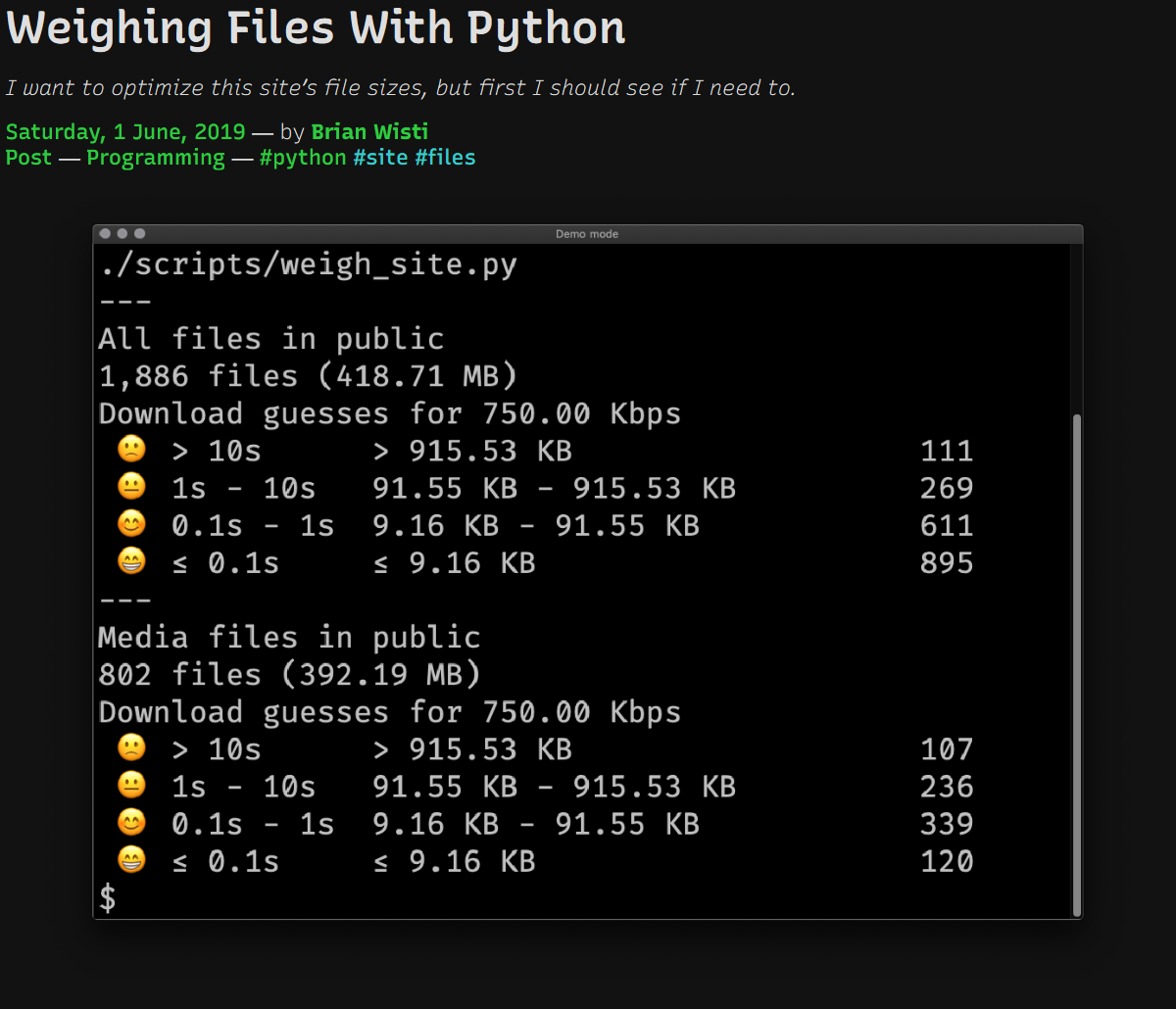
Yep, that’s a post header all right. What about validation? Did I get the microformats right?
Examining my microformats locally
I know I can validate my h-entry at IndieWebify or copy and paste to https://microformats.io, but I want to look at this stuff from the shell. Preferably with a single command. Ideally with something I can stash in my Pyinvoke tasks.py file.
mfpy and mf2util provide microformats2 handling for Python code.
I mainly want a dump of microformats found in a given URL, in a format easier for me to read than JSON. Here’s what I came up with.
I got carried away. This could have been its own post. Oh well. It’s like a two-for-one deal!
import json
import textwrap

from invoke import task
import mf2py
import mf2util
from ruamel.yaml import YAML
import toml
I need different formats for different purposes, so I import Python libraries for YAML and TOML along with the standard library JSON support.
def shorten_properties(d, width=80):
    """Find text in `d`, shortening it to fit in `width` columns"""
    if d is None:
        return

    if isinstance(d, dict):
        for key, value in d.items():
            d[key] = shorten_properties(value)
    elif isinstance(d, list):
        d = [ shorten_properties(i) for i in d ]
    elif isinstance(d, str):
        d = textwrap.shorten(d, width=width)
    return d
Sometimes microformat info is a wall of text. Quite often, in fact, since e-content includes the full content of any post. shorten_properties uses textwrap to keep large text properties from overwhelming me.
Now that I have the support code I need, it’s time for the Pyinvoke task.
@task(
    help={
        "url": "Web address to examine",
        "format": "preferred output format",
        "interpret": "whether to interpret the parsed entries",
        "everything": "whether to display items only or everything parsed",
        "shorten": "whether to shorten text found to 80 characters",
    }
)
def mf2(c, url, format="json", interpret=False, everything=False, shorten=True):
    """Display any microformats2 data from `url`"""
    entry = mf2py.parse(url=url)
    wants_json = format == "json"

    # Usually I just care about the h-* items
    if not everything:
        entry = {"items": entry["items"]}

    # Sometimes I want mf2util's summarized version
    if interpret:
        entry = mf2util.interpret(entry, url, want_json=wants_json)

    # I usually don't want a wall of text
    if shorten:
        entry = shorten_properties(entry)

    if format == "yml":
        YAML().dump(entry, sys.stdout)
    elif format == "toml":
        print(toml.dumps(entry))
    elif format == "json":
        print(json.dumps(entry, sort_keys=True, indent=2))
    else:
        raise KeyError(f"Unknown format '{format}' requested")
I could have made this a small script, but I’m pretty sure I’ll check microformats routinely while working on the site. Makes sense to have it readily available.
Let’s try out my new mf2 task.
$ invoke mf2 http://localhost:1313/2019/06/01/weighing-files-with-python/ -f yml
items:
- type:
  - h-entry
  properties:
    name:
    - Weighing Files With Python
    summary:
    - I want to optimize this site’s file sizes, but first I should see if I need
      to.
    published:
    - '2019-06-01T00:00:00+00:00'
    url:
    - http://localhost:1313/2019/06/01/weighing-files-with-python/
    author:
    - type:
      - h-card
      properties:
        name:
        - Brian Wisti
        url:
        - http://localhost:1313/
      value: Brian Wisti
    category:
    - Post
    - Programming
    - python
    - site
    - files
    photo:
    - http://localhost:1313/2019/06/01/weighing-files-with-python/cover.png
    content:
    - html: <div class="sidebarblock"> <div class="content"> <div [...]
      value: Updates 2019-06-02 adjusted a couple clumsy property methods with [...]
    syndication:
    - https://hackers.town/@randomgeek/102199106551447993
    - https://twitter.com/brianwisti/status/1134977256684761089
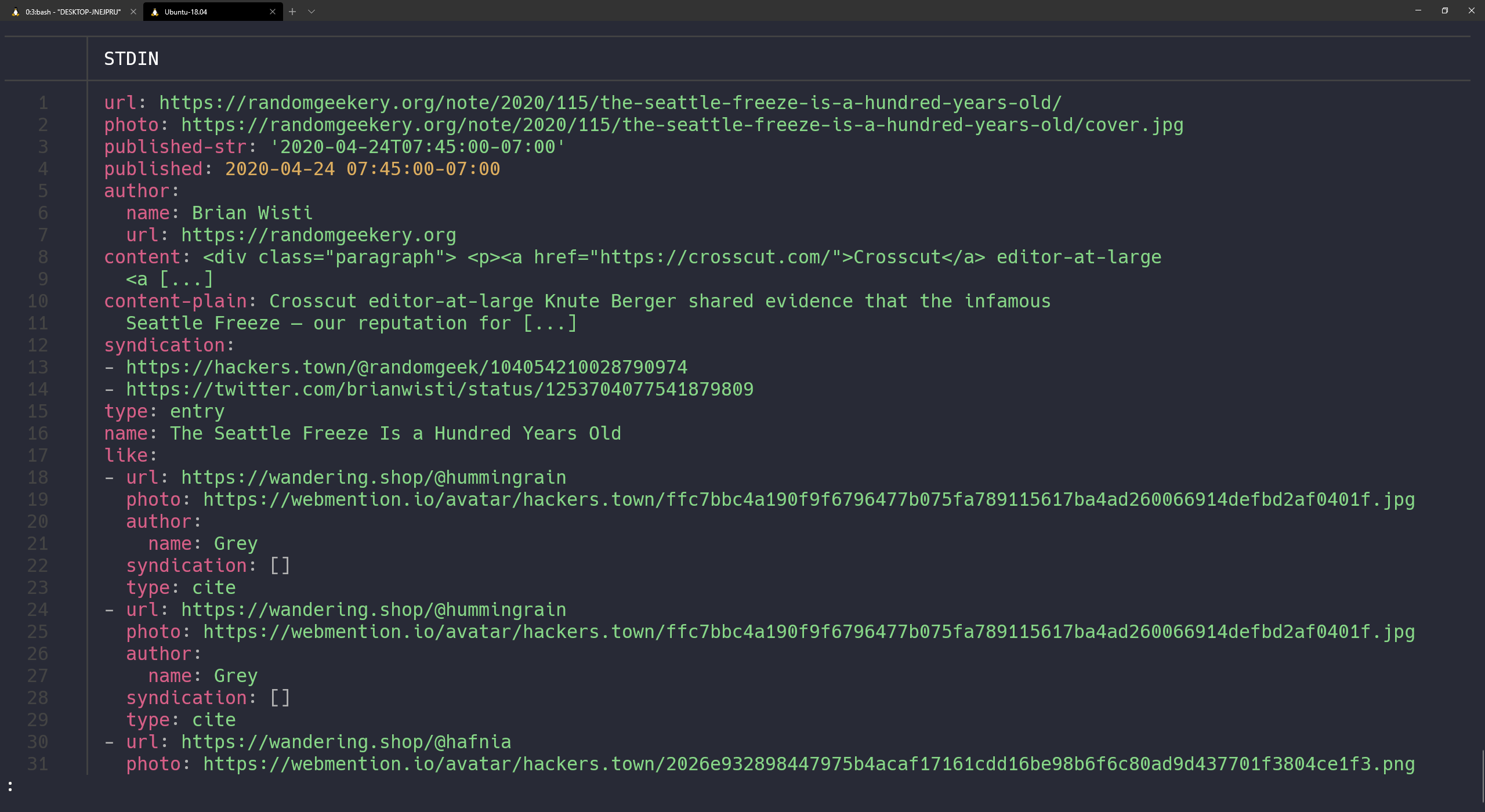
What about default JSON output and letting mf2util interpret the results?
$ inv mf2 http://localhost:1313/2019/06/01/weighing-files-with-python -i
{
  "author": {
    "name": "Brian Wisti",
    "url": "http://localhost:1313/"
  },
  "content": "<div class=\"sidebarblock\"> <div class=\"content\"> <div [...]",
  "content-plain": "Updates 2019-06-02 adjusted a couple clumsy property methods with [...]",
  "name": "Weighing Files With Python",
  "photo": "http://localhost:1313/2019/06/01/weighing-files-with-python/cover.png",
  "published": "2019-06-01T00:00:00+00:00",
  "summary": "I want to optimize this site\u2019s file sizes, but first I should see if I need to.",
  "syndication": [
    "https://twitter.com/brianwisti/status/1134977256684761089",
    "https://hackers.town/@randomgeek/102199106551447993"
  ],
  "type": "entry",
  "url": "http://localhost:1313/2019/06/01/weighing-files-with-python/"
}Nice. I can tidy it up a bit later. Probably end up using those mf2util functions. But this works great for now. And my h-entry looks good!
Examine microformats on other sites
Oh hey I can grab any URL. This handles another issue I had: trying to examine microformats on other sites.
Let’s grab Jacky Alciné’s h-card!
$ inv mf2 https://v2.jacky.wtf -f toml
[[items]]
type = [ "h-card",]

[items.properties]
name = [ "Jacky Alciné",]
photo = [ "https://v2.jacky.wtf/media/profile-image",]
url = [ "https://v2.jacky.wtf",]
[[items]]
type = [ "h-feed",]
[[items.children]]
type = [ "h-entry",]

[items.children.properties]
author = [ "https://v2.jacky.wtf",]
url = [ "https://v2.jacky.wtf/post/a53bb7c4-2831-4666-ad85-75433ab2b1c3",]
published = [ "2020-04-26T08:57:39-07:00",]
[[items.children.properties.in-reply-to]]
type = [ "h-cite",]
value = "https://twitter.com/tiffani/status/1254438450897530882"

[items.children.properties.in-reply-to.properties]
url = [ "https://twitter.com/tiffani/status/1254438450897530882",]
[[items.children.properties.in-reply-to.properties.author]]
type = [ "h-card",]
value = "https://twitter.com/tiffani"

[items.children.properties.in-reply-to.properties.author.properties]
name = [ "Tiffani Ashley Bell",]
url = [ "https://twitter.com/tiffani",]
[[items.children.properties.in-reply-to.properties.content]]
html = "Definitely need to take a long walk today. Staying in the house all day is [...]"
value = "Definitely need to take a long walk today. Staying in the house all day is [...]"

[[items.children.properties.content]]
html = "<p>Just came back from one and I felt so much better about this with the [...]"
value = "Just came back from one and I felt so much better about this with the way [...]"


[items.properties]
name = [ "Last Note",]
uid = [ "https://v2.jacky.wtf/stream",]
url = [ "https://v2.jacky.wtf/stream",]
author = [ "https://v2.jacky.wtf",]
Neat. Now I can collect more h-cards for a blogroll idea I had. Better post this first.
Backlinks
Got a comment? A question? More of a comment than a question?
Talk to me about this page on: mastodon
Added to vault 2024-01-15. Updated on 2024-02-02