Use file for everyday summaries. Use ExifTool when you need to know everything.
The problem
I am once again puttering around with my site.
I have an image here.
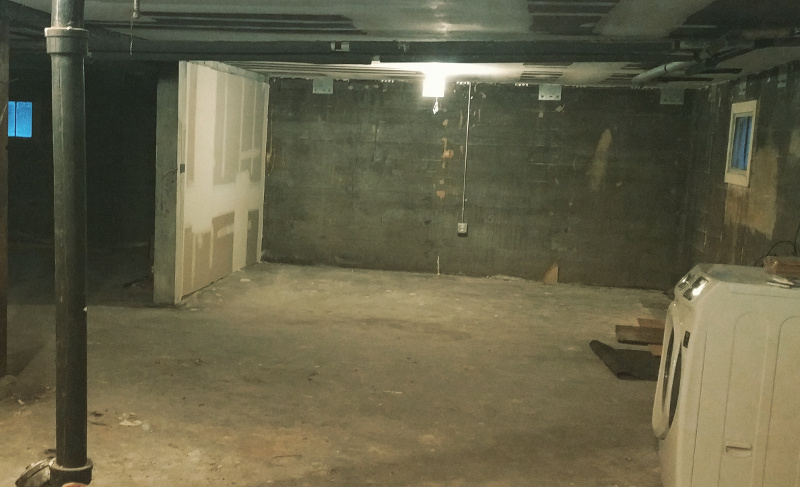
Do I need to resize it? Should find out how big it is first.
$ exa basement-original.jpg
Permissions Size User   Date Modified Git Name
.rw-rw-r--  131k random 20 Apr  9:04   -- basement-original.jpg
No I don’t mean file size. I mean geometry. How many pixels wide, and how many high? exa is nifty though. You should try it out.
I don’t want to leave my shell session to do it either. Sure that’s just stubbornness on my part. I could get the necessary information from my desktop’s file browser, but I type quicker than I click.
file is everywhere
file is a standard utility, which means it’s available on pretty much any Unix or Unix-like system you use. It works by matching a file’s internal details to entries in a magic database and reporting its findings. magic can be extended, though the details are beyond me for now.
$ file basement-original.jpg
basement-original.jpg: JPEG image data, JFIF standard 1.01, resolution (DPI), density 72x72, segment length 16, progressive, precision 8, 800x487, frames 3
basement-original.jpg is a jpeg image. Yep, that checks out. Let’s see — 800x487. That looks like a geometry value. 800 pixels wide and 487 pixels high, if I remember the order right.
I want more detail, but this is all I can get from file. That’s what ExifTool is for.
ExifTool knows everything
ExifTool lets me read and edit metadata for images, music, PDF, Word files, videos — a dizzying assortment of files are supported.
You can install ExifTool with the downloads listed on its site or using your favorite package manager.
$ brew install exiftoolDefault usage returns every bit of information ExifTool thinks is relevant for the file type.
$ exiftool basement-original.jpg
ExifTool Version Number         : 11.85
File Name                       : basement-original.jpg
Directory                       : .
File Size                       : 129 kB
File Modification Date/Time     : 2020:04:20 09:04:28-07:00
File Access Date/Time           : 2020:04:21 10:08:57-07:00
File Inode Change Date/Time     : 2020:04:20 09:04:28-07:00
File Permissions                : rw-rw-r--
File Type                       : JPEG
File Type Extension             : jpg
MIME Type                       : image/jpeg
JFIF Version                    : 1.01
Resolution Unit                 : inches
X Resolution                    : 72
Y Resolution                    : 72
Image Width                     : 800
Image Height                    : 487
Encoding Process                : Progressive DCT, Huffman coding
Bits Per Sample                 : 8
Color Components                : 3
Y Cb Cr Sub Sampling            : YCbCr4:4:4 (1 1)
Image Size                      : 800x487
Megapixels                      : 0.390
800 pixels wide, 487 pixels high. I remembered correctly! While I’m here, let’s look at ways to fine-tune the output.
We could cut down on the noise by specifying the fields or tags we want to see.
$ exiftool -ImageWidth -ImageHeight basement-original.jpg
Image Width                     : 800
Image Height                    : 487
We could use -S for more compact output focused less on tabular layout.
$ exiftool -S -ImageWidth -ImageHeight basement-original.jpg
ImageWidth: 800
ImageHeight: 487
We could tell ExifTool to format its report for processing by CSV or JSON tools.
$ exiftool -j basement-original.jpg
[{
  "SourceFile": "basement-original.jpg",
  "ExifToolVersion": 11.85,
  "FileName": "basement-original.jpg",
  "Directory": ".",
  "FileSize": "129 kB",
  "FileModifyDate": "2020:04:20 09:04:28-07:00",
  "FileAccessDate": "2020:04:21 10:08:57-07:00",
  "FileInodeChangeDate": "2020:04:20 09:04:28-07:00",
  "FilePermissions": "rw-rw-r--",
  "FileType": "JPEG",
  "FileTypeExtension": "jpg",
  "MIMEType": "image/jpeg",
  "JFIFVersion": 1.01,
  "ResolutionUnit": "inches",
  "XResolution": 72,
  "YResolution": 72,
  "ImageWidth": 800,
  "ImageHeight": 487,
  "EncodingProcess": "Progressive DCT, Huffman coding",
  "BitsPerSample": 8,
  "ColorComponents": 3,
  "YCbCrSubSampling": "YCbCr4:4:4 (1 1)",
  "ImageSize": "800x487",
  "Megapixels": 0.390
}]
Hang on. I feel compelled to be a bit fancy.
Piping to xsv for aggregate information about site images.
$ exiftool -csv -r content \
  | xsv search -s MIMEType 'image/.+' \
  | xsv select ImageWidth,ImageHeight \
  | xsv stats \
  | xsv select field,min,max,mean \
  | xsv table
  682 directories scanned
  419 image files read
field        min  max   mean
ImageWidth   27   5120  1337.1172248803825
ImageHeight  27   4032  1009.7368421052624
Hm. I must have some icon files in there somewhere.
For more fun, point it at some music files. Heck, it will try to give useful information for text!
$ exiftool index.adoc
ExifTool Version Number         : 11.85
File Name                       : index.adoc
Directory                       : .
File Size                       : 4.8 kB
File Modification Date/Time     : 2020:04:21 12:58:13-07:00
File Access Date/Time           : 2020:04:21 12:58:14-07:00
File Inode Change Date/Time     : 2020:04:21 12:58:13-07:00
File Permissions                : rw-rw-r--
File Type                       : TXT
File Type Extension             : txt
MIME Type                       : text/plain
MIME Encoding                   : us-ascii
Newlines                        : Unix LF
Line Count                      : 189
Word Count                      : 619
Here’s the file output in comparison.
$ file index.adoc
index.adoc: ASCII text
I could probably write some magic configuration to get more information. But installing ExifTool was easier.
Good enough?
file is universally available and gave me the details I needed today. ExifTool gives me everything I needed and then some. I’ll most likely keep it available on my systems.
And no, I’m not going to worry about resizing that image for now.
Got a comment? A question? More of a comment than a question?
Talk to me about this page on: mastodon
Added to vault 2024-01-15. Updated on 2024-02-02