My macOS iTunes music library includes over 21,000 songs. Some of those tracks contain the wrong information. Wrong title, wrong album, wrong artist, wrong year.
Beets
The open source Beets command line tool helps manage your music library.
The purpose of beets is to get your music collection right once and for all. It catalogs your collection, automatically improving its metadata as it goes using the MusicBrainz database. Then it provides a bouquet of tools for manipulating and accessing your music.
Plugins allow beets to perform more than media management. I won’t talk about most of them today. I don’t want to overwhelm myself. I will keep my focus on using beets from the command line to help me fix my iTunes library.
Alternatives
I prefer command line open source tools. It’s a comfortable habit. You have other options, though.
If you prefer using a mouse, try out Picard from MusicBrainz. Its manual includes an iTunes guide, so you won’t have to guess your way through the process.
Installation and Configuration
beets is written in Python. It works with both Python 2 and 3, but I had better results with my hooks when using Python 2.
I already installed pyenv and pyenv-virtualenv via Homebrew. They aren’t strictly needed, but having distinct environments simplifies things when you have several Python-related projects.
$ pyenv virtualenv 2.7.14 beets$ pyenv shell beetsbeets uses pyacoustid for acoustic fingerprinting, which helps identify tracks by their audio data. pyacoustid needs the Chromaprint library, so I install that also.
$ brew install chromaprint$ pip install beets pyacoustidThis Google Groups thread got me started on configuration. My settings focus on safely cataloging music rather than organizing it.
# using default library ~/.beets/config/library.db# using default directory ~/Music, but see 'copy'
plugins: chroma edit ftintitle fromfilename importadded hook
import:  copy: no         # Copy the file to our directory when importing?  incremental: yes # Skip directories we already imported?  write: no        # Automatically write the file on library import / update?  resume: yes      # Resume interrupted imports?  log: beets.log   # Where should we write what we do?
match:  strong_rec_thresh: 0.1            # Any difference less than this is a strong recommendation  preferred:                        # Put these at the top of recommendations    countries: [US, GB|UK]          # My favorite music publishing countries    media: [CD, Digital Media|File] # My favorite music sources    original_year: yes              # entry year is close to entry original_year
# Tell iTunes to add and/or update the track in its library after we write a file.hook:  hooks:    - event: after_write      command: osascript /Users/brianwisti/bin/iTunesRefresh.scpt "{item.path}"
The plugins add important functionality.
- chroma
- Use acoustic fingerprinting to identify songs by their sound. Slower, but helps with tracks that have bad metadata.
- edit
- Edit details of your songs after importing
- ftintitle
- Puts featured artist information in song title instead of artist.
- fromfilename
- Try to guess missing metadata from the filename of a song.
- importadded
- Use the file’s modification time to determine when you added it to your library. Useful for importing an existing library.
- hook
- Run commands for specific beet events.
Configuration is out of the way. Let’s import music.
$ beet import ~/Music/iTunes/iTunes Media/MusicImporting a large music library takes time, especially with acoustic
fingerprinting. My music took a full weekend, even with match settings giving
it more leeway to automatically use the likeliest matches. But at the end of it
all, here’s what I had.
$ beet statsTracks: 22112Total time: 8.7 weeksApproximate total size: 107.8 GiBArtists: 2498Albums: 2405Album artists: 1117I won’t tell you about all the amazing query support or format strings in beets. Instead let’s just list matches for a random word.
$ beet ls pigeonBert - Songs From the Street: 35 Years of Music - Doin' the PigeonCyndi Lauper - Hat Full of Stars - Sally's PigeonsCyndi Lauper - Twelve Deadly Cyns... and Then Some - Sally's PigeonsTom Lehrer - An Evening Wasted With Tom Lehrer - Poisoning Pigeons in the ParkLo Fidelity Allstars - How to Operate With a Blown Mind - Battle Flag feat. PigeonhedRJD2 - Have Mercy - Have Mercy (Remix feat Lyrics Born and Pigeon John)RJD2 - Have Mercy - Have Mercy (Remix feat Lyrics Born and Pigeon John)Looks like I have some duplicates. I can worry about that another day.
Tell Beets to Tell iTunes to Refresh
Now that beets has imported everything, it’s time to write it all back out and update the iTunes library.
Write Some AppleScript
I rarely use AppleScript, so it took a combination of Web searching and guesswork to come up with this. This post from Doug’s AppleScripts for iTunes blog and this Ask Different answer got me most of the way there. The guesswork finished it off.
on run (argv) tell application "iTunes" set filename to POSIX file (argv's item 1 as string) as alias try set trackRef to (add filename) refresh trackRef end try end tellend runThe Beets Hook
osascript lets you run AppleScript commands and files from the command line.
This after_write hook is only called when song metadata is updated in the file
itself.
Writing every track with the hook after that big import took about four hours — but I could leave it in the background while I did other stuff.
After the big import
Sometimes beets identifies tracks incorrectly. It happens. For example, Bob Dylan did not sing Stuck in the Middle With You.
I could modify that song with beets modify, but I can also do it with the
edit plugin.
$ beet edit `stuck in the middle`This pulls up $EDITOR, which in my case is Vim.
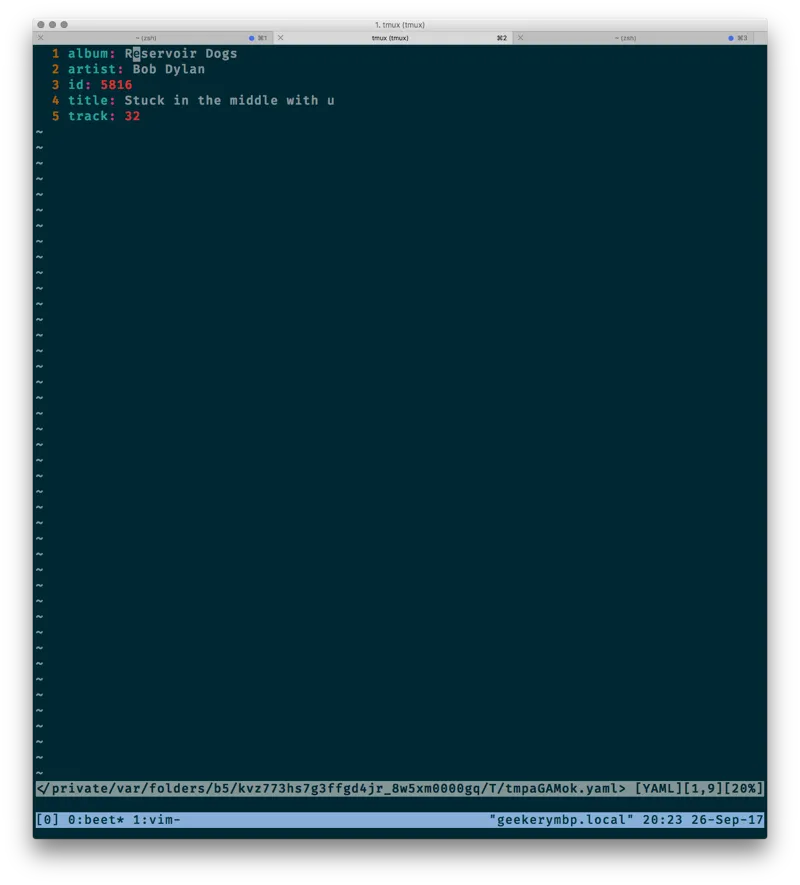
After the import and update, I saw something else in iTunes that bugged me.
iTunes can sort by year, but not by original_year — the year an album was
originally released, rather than the year that particular file or CD was
available.
I don’t know how to edit that with beets commands, but I can work directly with its underlying SQLite database. Maybe I’m being a little bold here, but I can always spend another weekend reimporting my music.
sqlite> update items set year = original_year where year != original_year and original_year != 0;sqlite> update albums set year = original_year where year != original_year and original_year != 0;beet write finalizes those changes, and updates iTunes again thanks to the
after_write hook.
Everything worked out for me this time. But remember, if you change values in the database, they happen in real life too!
What Next?
That’s good enough for today. I’ll correct entries as I see them, but things are definitely better than when I started.
To see what you can do with beets, check out the plugins.
Play with the query support and format strings. Have fun!